
Last updated on
Oct 31, 2026

Get the free Receipt Template
We are not affiliated with any brand or entity on this form

Fill out
Complete the form online in a simple drag-and-drop editor.

eSign
Add your legally binding signature or send the form for signing.

Share
Share the form via a link, letting anyone fill it out from any device.

Export
Download, print, email, or move the form to your cloud storage.
Why pdfFiller is the best tool for your documents and forms


End-to-end document management
From editing and signing to collaboration and tracking, pdfFiller has everything you need to get your documents done quickly and efficiently.
Accessible from anywhere
pdfFiller is fully cloud-based. This means you can edit, sign, and share documents from anywhere using your computer, smartphone, or tablet.
Secure and compliant
pdfFiller lets you securely manage documents following global laws like ESIGN, CCPA, and GDPR. It's also HIPAA and SOC 2 compliant.
What is Receipt Template
The Receipt Template is a business form used by individuals and organizations to document payments received.
pdfFiller scores top ratings on review platforms




Very easy to move around in the web-site.
It is easy to use and works well with google drive.
Who needs Receipt Template?
Explore how professionals across industries use pdfFiller.

Receipt Template is needed by:
-
Small business owners documenting transactions
-
Freelancers issuing payment receipts
-
Customers needing proof of payment
-
Accounts departments tracking cash flow
-
Event organizers managing ticket sales
-
Retailers keeping sales records
Comprehensive Guide to Receipt Template
Understanding the Receipt Template
A receipt template is a structured document used to officially record payments received. Its primary purpose is to provide a clear, formal record of transactions, which is essential for both businesses and individuals. By utilizing a payment receipt form, users ensure that every financial exchange is documented, promoting transparency and accountability.
Having a formal record of payments received not only enhances organization but also fosters trust with clients and customers. This structured approach aids in financial tracking and can be particularly beneficial during audits or financial reviews.
Key Benefits of Using a Receipt Template
Utilizing a business receipt template offers several advantages that streamline operations and enhance relationships with clients. First, it fosters professionalism; clients appreciate receiving clear documentation of their payments, which reinforces credibility.
Additionally, a printable receipt template simplifies record-keeping and financial management. It provides a straightforward way to track transactions, making it easier to maintain accurate financial records and prepare for tax obligations.
Main Features of the Receipt Template
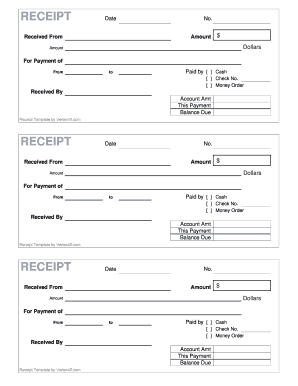
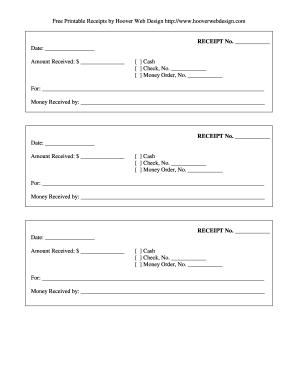
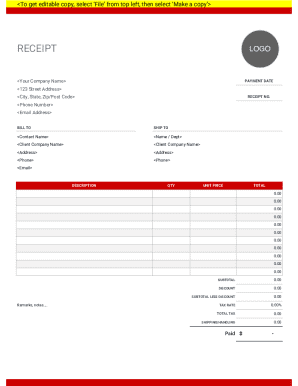
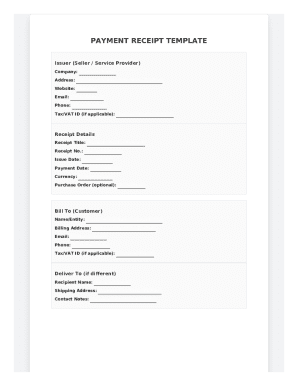
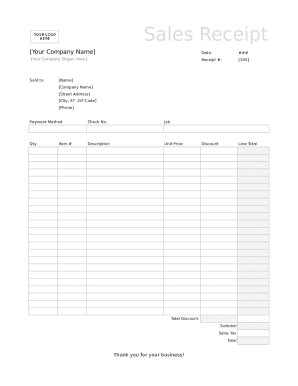
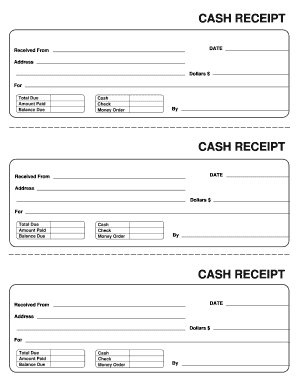
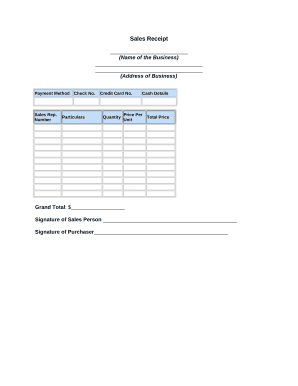
The receipt template includes various key fields that are crucial for accurate documentation. Primary fillable fields consist of "Date," "Received From," and "Amount," which capture essential details of the transaction.
Other features of the template include checkboxes for multiple payment methods, such as cash, credit, or electronic payment, along with dedicated space for additional notes. This means users can customize their receipts to suit specific transaction needs.
Who Should Use the Receipt Template?
The receipt template is designed to serve various users, including different types of businesses and individuals. Small businesses such as freelancers, retail shops, or service providers can greatly benefit from using a standardized format to document payments received.
Moreover, individuals needing to provide proof of payment, such as tenants or service recipients, can effectively use this template. By employing a business receipt template or a payment receipt form, they ensure accuracy and reliability in their financial documentation.
Step-by-Step Guide: How to Fill Out the Receipt Template Online
Completing the receipt template online involves several straightforward steps to ensure accuracy. Begin by filling in the "Date" field with the date of the transaction.
Next, detail the "Received From" section with the name of the payer and then input the "Amount" received. Make use of the available checkboxes to indicate the payment method. Lastly, if necessary, add any relevant notes in the designated area.
For improved efficiency, utilize pdfFiller's platform to edit and save your completed receipt, ensuring clarity and precision in your documentation.
Security and Compliance with the Receipt Template
When using any financial documentation, security is paramount. pdfFiller implements robust security measures, including 256-bit encryption, to safeguard user information and sensitive data.
Compliance with regulations such as HIPAA and GDPR further assures users that their financial documents remain protected. Understanding the importance of privacy and data protection enhances trust in the use of online receipt templates.
How to Download and Print the Receipt Template
Obtaining the printable receipt template is a simple process. Users can easily download the template in PDF format from pdfFiller's platform with just a few clicks.
After downloading, printing the template requires attention to detail. Ensure that the print settings are correctly configured to maintain the document's formatting for clear visibility and legibility.
After Filling Out the Receipt Template: Next Steps
Once the receipt template is completed, users should consider the best submission methods for providing the receipt to clients. This might include email or physical delivery, depending on the recipient's preference.
Additionally, tracking and confirming receipt deliveries are vital. Implementing a system to verify that clients have received their receipts can enhance accountability and communication.
Real-life Examples of Completed Receipt Templates
For users unfamiliar with filling out the template, visual guidance can be immensely helpful. Providing sample images of filled-out receipt templates allows users to understand the expected layout and format.
These examples can clarify how to interpret completed fields, emphasizing their significance in financial documentation, supporting users in effectively utilizing the template.
Enhance Your Receipt Management with pdfFiller
Leveraging pdfFiller’s tools can significantly enhance the management of receipts and related documents. The platform offers additional features that facilitate easier document handling, such as editing and secure sharing.
Users are encouraged to create a free account to take full advantage of the receipt template, ensuring they have access to all necessary resources for effective receipt management.
How to fill out the Receipt Template
-
1.To access the Receipt Template on pdfFiller, head to the pdfFiller website and use the search bar to find the 'Receipt Template'.
-
2.Once located, click on the template to open it in the pdfFiller interface.
-
3.Before filling out the form, gather essential information such as the date of the transaction, the recipient's name, the payment amount, and the payment method used.
-
4.In pdfFiller, start by clicking on the fields provided for 'Date No.', 'Received From', 'Amount', and 'Paid by'.
-
5.Utilize the autocomplete feature for fields to enhance efficiency and ensure accuracy when entering recipient details.
-
6.Make sure to select the appropriate checkboxes for payment methods like cash, credit, or check.
-
7.As you fill in the form, regularly review each entry to ensure all necessary details are recorded correctly.
-
8.Once completed, preview the filled document to check for any errors or omissions.
-
9.After review, save your changes by clicking the 'Save' button, and consider downloading the document in your preferred format, such as PDF.
-
10.If needed, you can also directly submit the form via email or the platform’s sharing options. Ensure you select the right recipients before sending.

What information do I need to prepare before filling out the Receipt Template?
Before filling out the Receipt Template, gather necessary information such as the date of the transaction, the recipient's name, the amount received, and the payment method. This ensures you can complete the form more efficiently.
Can I use the Receipt Template for personal transactions?
Yes, the Receipt Template can be used for personal transactions as well as business dealings. It serves as a formal record of payment for both individuals and businesses.
How do I download the completed Receipt Template?
Once you have filled out the Receipt Template in pdfFiller, you can download it by clicking the 'Download' button. Choose your preferred file format, such as PDF, for your records.
Is notarization required for the Receipt Template?
No, notarization is not required for the Receipt Template. You can fill it out and use it at your discretion without a notary.
How can I ensure my Receipt Template is error-free?
To ensure your Receipt Template is error-free, carefully review each entry after completion. It's also helpful to have another person proofread it before finalizing.
What are common mistakes to avoid when using the Receipt Template?
Common mistakes include omitting essential details like the date or recipient’s name, selecting incorrect payment methods, and entering incorrect amounts. Always double-check all information before finalizing.
How quickly can I receive a completed Receipt Template?
The time to complete a Receipt Template depends on how quickly you gather the required information. Completing the form itself only takes a few minutes once you have the necessary details ready.



Get the latest insights from our blog


If you believe that this page should be taken down, please follow our DMCA take down process
here
.
This form may include fields for payment information. Data entered in these fields is not covered by PCI DSS compliance.